
The most affordable knowledge base
Flat pricing, unlimited users, and every feature on the free plan.
NeetoKB is a knowledge base tool that makes creating, managing, and sharing information easy, whether you need an internal knowledge base for your team or a help center for your customers. Write in rich text with drafts and version history, organize articles into nested categories, and publish on your own domain in a theme you control. Already on Zendesk, Freshdesk, Intercom, Help Scout or Zoho Desk? We'll move your articles across for free.

Free for unlimited users, with every feature. Pro is $300 a year, flat, for the whole team.


What happens when someone looks for an answer
Whether they arrive from your product, a support email, or a Google search, NeetoKB follows the same four steps.
They search
A visitor asks a question. Search reads titles, body text, and keywords to match the words customers use, not just the words you wrote.
Search finds it anyway
Articles match by meaning and words, so “my card got declined” still finds “Failed payments.”
They read and rate
The article opens on your domain and theme, with a table of contents, related articles, and helpful or not helpful voting.
You see the gap
Reports show searches with no results, popular articles, not-helpful votes, and URLs returning 404s.
Drafts and version history
Write it once, and keep it right
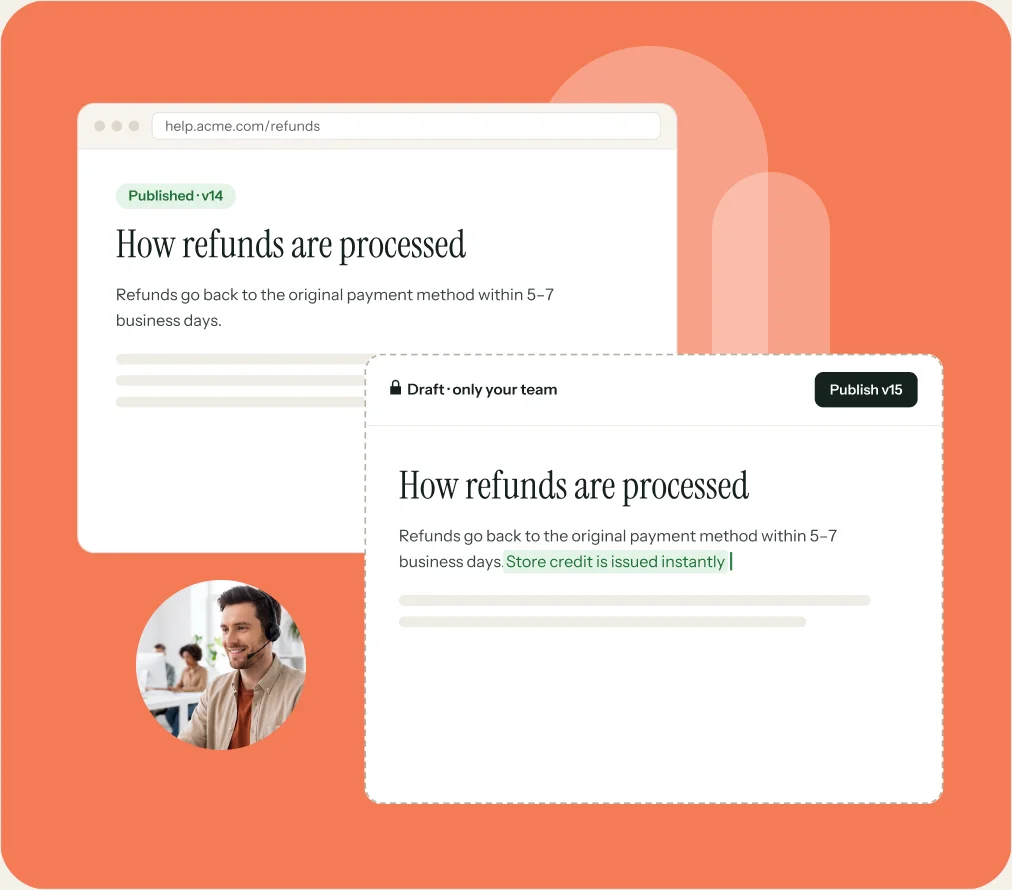
Draft an article, share it with a teammate, and publish when it reads well. Every save becomes a version, so you can review changes and restore earlier drafts. With 37,000+ revisions stored in NeetoKB, nothing is ever one bad edit away from gone.
The typical NeetoKB article is about 210 words. Answering a question well takes less effort than most teams assume, which is why help centers often never get started.
- Drafts stay private while the published version keeps serving readers
- Internal notes sit on the article, visible to your team and nobody else
- Schedule an article to go live later, in your own time zone
- Share an unlisted link with one customer without listing the article publicly
- NeetoKB warns you when a teammate has edited the article you have open
Where KB fits
Four situations NeetoKB was built to fix. If one of these sounds familiar, the rest of the page shows the fix.
The same question, ten times a week
Support answers it in a ticket, sales answers it on a call, and nobody can point to a single URL. Write it once in NeetoKB and send the link instead. Your team can search the same articles from inside NeetoDesk and drop one into a reply without leaving the ticket.
A help center nobody can find anything in
Articles pile up with no shape and search keeps coming back empty. Folders and sub-folders give the collection a structure, keywords catch the words customers actually type, and the failed-searches report tells you precisely what people looked for and did not find.
Docs that look nothing like your product
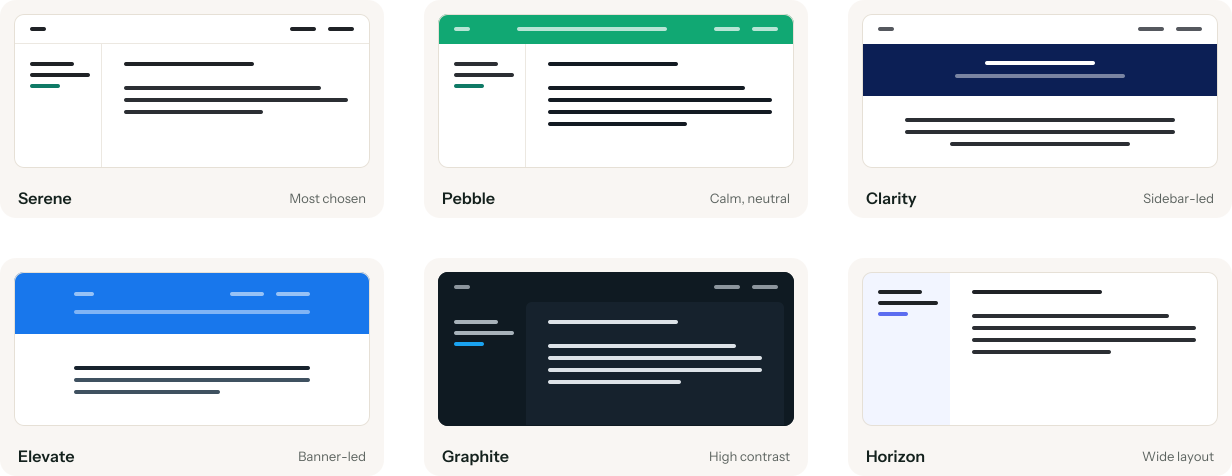
A help center on someone else's domain, in someone else's colors, spends the trust your product just earned. Start from one of six themes, change the colors and typography, add your logo, header and footer links, and publish it on your own domain.
A bill that grows with every invite
Per-seat pricing quietly taxes you for asking the engineer who actually knows the answer, so they never get invited and the article never gets written. NeetoKB has unlimited users on both plans, including the free one. Pro is a flat $300 a year however many of you there are.
Free migration
Switching from somewhere else?
We'll move everything for you.
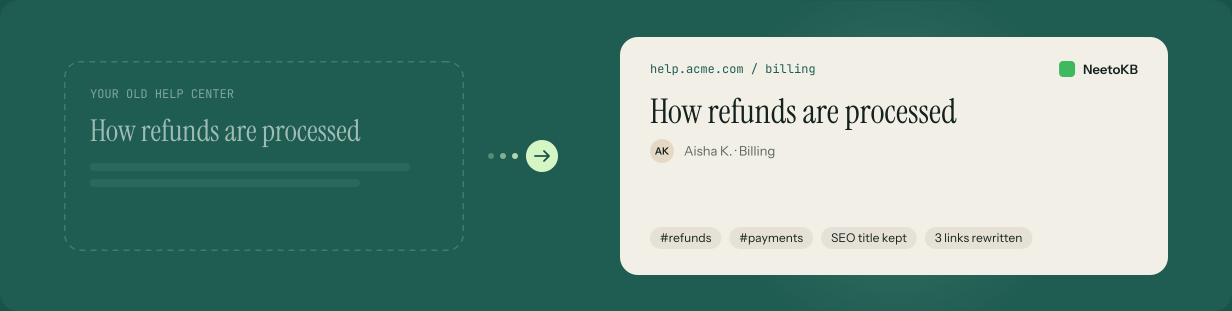
Zendesk, Freshdesk, Intercom, Help Scout, Zoho Desk — wherever you are now, we will port your knowledge base articles, categories, authors, tags, attachments, and SEO settings. The links between your own articles are rewritten to their new addresses, so the internal web of your docs still holds together. Most migrations finish in under a week. Free.
- Who runs it
- We do
- a test migration first, for you to review
- What it costs
- Free
- on the free plan as well as Pro
- Typical time
- < 1 week
- for most help centers
- Phase 01
Test migration
We copy your articles as a test run for review. Your current help center keeps running untouched. If a category or author needs to map differently, we adjust it and run it again.
- Phase 02
Switchover
You choose the date. Attachments take the longest, because every file is downloaded and uploaded again. Then we point your domain at NeetoKB and your new knowledge base is live.
What comes across
- 01Articles with their content, authors, and published or draft state
- 02Categories and folders, in the structure you already had
- 03Tags, and the keywords that make each article findable
- 04Attachments and inline images, re-uploaded and re-linked
- 05SEO settings: page titles, meta descriptions, and Open Graph data
- 06Links between your own articles, rewritten to their new addresses
Themes and branding
Match your brand, and
make it your own
A help center on someone else's domain, in someone else's colors, spends the trust your product just earned. Start from one of six themes, change what you like, and publish it at docs.yourcompany.com.
- Header, banner, sidebar, body, card, and footer colors, each set separately
- Typefaces for headings, body text, and links
- Your logo, a banner image, and your own header and footer links
- Clone any theme to make it yours, or edit the templates and CSS directly
SEO and sharing
The article you wrote on Tuesday,
still answering people in March
Most people who read your help center never set out to find it. They typed their problem into Google and landed on one article. That only happens if the article carries a title, a description, and an address a search engine can make sense of, so NeetoKB gives every article all three without you thinking about it.
Titles and descriptions
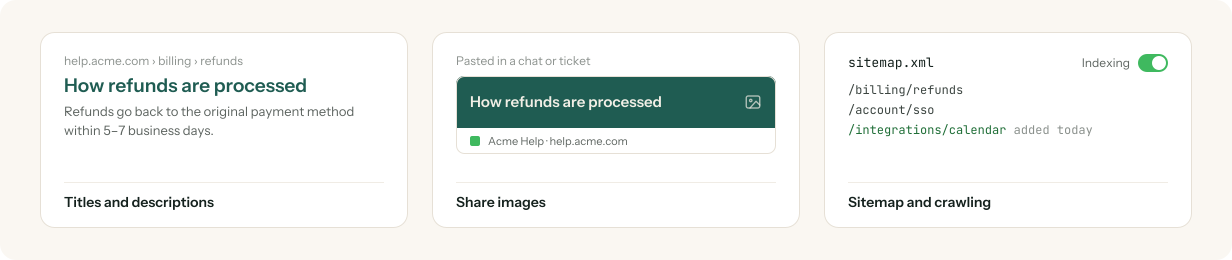
Set the page title and meta description per article, with defaults for every other page and the keywords customers use.
Share images
Generate an Open Graph image per article, so links pasted in Slack or tickets arrive as a card, not a bare URL.
Sitemap and crawling
Keep the sitemap and robots.txt current as you publish, with a switch that controls search engine indexing.
Search analytics
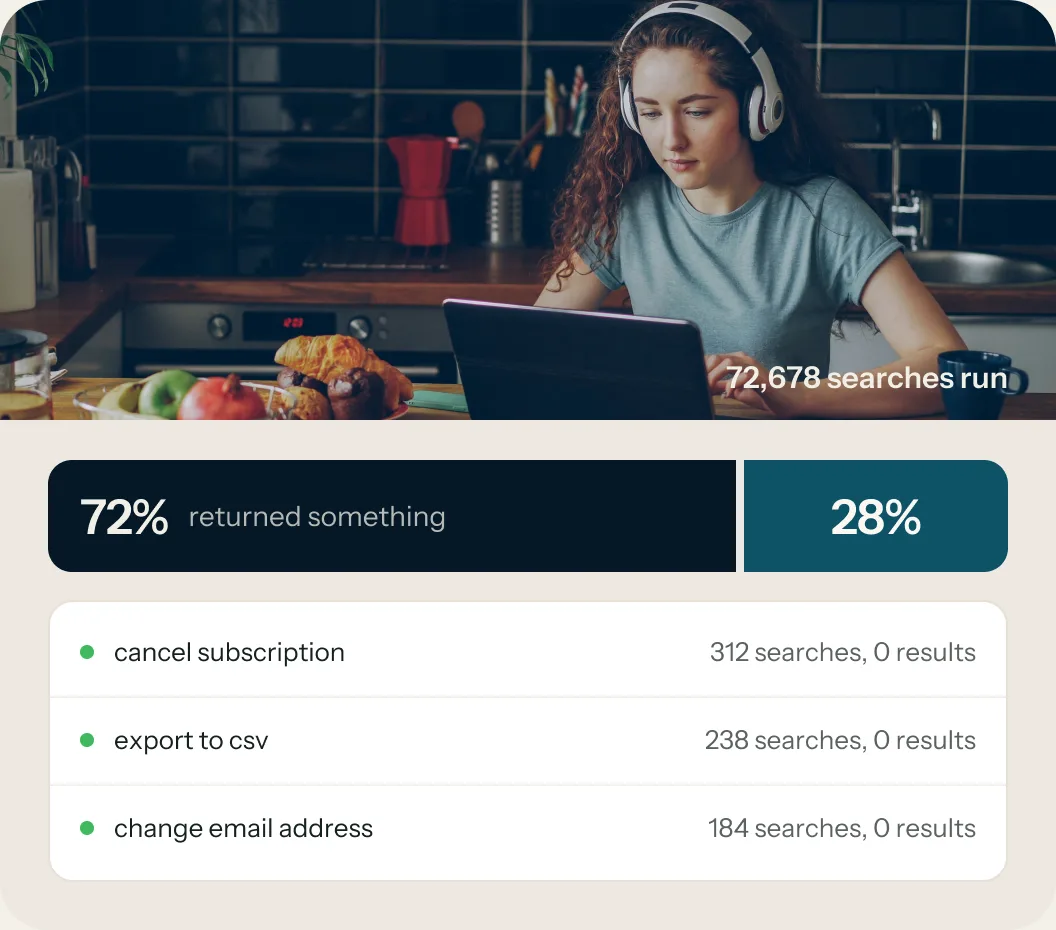
The searches that found nothing are your writing list
NeetoKB records every search, every article visit, every 404, and every helpful vote, then turns them into the list of articles you have not written yet. Across NeetoKB, 72,678 searches have been run and 72% of them returned something. That last 28% is the backlog, and it is specific.
- Popular searches and failed searches, ranked
- Article visits over time, and the URLs that returned 404
- Most helpful and least helpful articles, straight from reader votes
- Top contributors, so you know who is carrying the docs
- A monthly summary in your inbox if you want it

API and webhooks
Your knowledge base,
readable by everything else
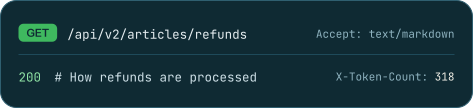
A documented REST API serves articles, folders, authors, search, and recommendations. Ask for an article as Markdown and you get clean Markdown back, with a token count in the response header, which is exactly what a language model wants to read. Create API keys with labels and expiry dates, push events to your own systems with webhooks, or wire NeetoKB into Zapier.
- Versioned public API, v1 and v2
- Any article as HTML or as Markdown, from the same endpoint
- Webhooks for article events, and a Zapier connection for everything else
- Semantic search over your articles, exposed as its own endpoint
Access control
Not every knowledge base
is a public one
The same product runs your customer help center and your internal handbook. What changes is who is allowed through the door, and that is one setting.
- Custom roles and permissions for the people who write
- Google and Apple Sign-in, or a one-time code by email
- IP restriction, so an internal handbook is reachable from the office and nowhere else

Public
Anyone can read it and search engines can index it. The normal setting for a customer help center.

Password
One shared password in front of the whole site. Enough for a partner guide or a closed beta.

Email keyword
Let people with matching email keywords in. They get a one-time code and they're in.

Private
Signed-in members only. Nothing public, nothing indexed. This is how a team handbook runs.
Other things you can do
in NeetoKB
Nested categories
Categories inside categories, so a growing library keeps a shape a reader can follow. Drag and drop to reorder either.
Two people, one article
Collaborative editing stops a teammate's save from quietly overwriting yours: NeetoKB tells you the article changed before you lose the work.
Related articles
Point an article at what a reader is likely to need next, and it appears at the end of the page instead of in a dead end.
Organize it your way
Folders and sub-folders, drag-and-drop reordering, tags for your team's own filing, and per-article keywords that catch the words customers search for.
Nothing disappears by accident
Archive an article to take it off the site without deleting it. Trash holds deleted articles for 30 days, and version history holds every draft before that.
Links that survive a rename
A permalink that never changes, automatic redirects from old slugs, and your own redirect rules for restructures, maintenance pages, and campaigns.
The right article on the right page
Recommendations match articles to the page a visitor is on, so the NeetoChat widget on your billing screen shows billing articles, not the getting-started guide.
Read it in their language
The admin interface ships in 37 languages, so the people writing your docs do not have to work in English to do it.
More answers, for a lot less.
Since 2021, teams have written more than 160K articles in NeetoKB, about 3,700 every month. The free plan comes with unlimited users and every feature. When you want the Neeto branding gone, Pro is a flat $300 a year, or $50 a month, for the whole workspace, however many of you there are.
- 160K+Articles written
so far - $0Unlimited users
on the free plan - $300A year for Pro
flat, not per user
Our wall of love
Recently started inputting my documents and such into NeetoKB. Just unreal organization and support for my clients. I love it.
I've never worked with a company that is so responsive to issues. Once again, thank you, Neeto team!
I've been absolutely amazed at the product quality and your pricing philosophy. It's such a life saver for early stage founders in so many aspects. I've already recommended it to over 10+ people, so I guess the word of mouth is paying off :)
I converted from Loom to @NeetoHQ. It's got a whole suite of tools that are about to replace my stack. Calendly is next. Then probably Notion, Typeform, and more.
Neeto is a game changer for me, I'm glad to see that you guys are always thriving to make every products better!
The questions every team asks, answered
These are the tickets we would get if you emailed us your questions one at a time. We went ahead and closed them all.
Moving to NeetoKB
- #113Do links between our articles still work after the move?Yes
- #115Do authors and tags move with the articles?Yes
- #118Do attachments and inline images survive?Yes
- #124Do page titles and meta descriptions carry over?Yes
- #131Can we keep our old help center up during the move?Yes
- #140Is the migration really free?Yes
Working in NeetoKB
- #212Can we run it on our own domain?Yes
- #213Can we change the colors and typography?Yes
- #215Can we restore an article to an earlier version?Yes
- #218Can we keep the whole help center private?Yes
- #224Can we see what people searched for and did not find?Yes
- #231Can we schedule an article to publish later?Yes
- #232Can support insert an article into a ticket reply?Yes
- #240Can we pull articles out through an API?Yes
- #247Can we get articles back as Markdown?Yes
- #251Can we restrict access by IP address?Yes
- #253Can we recover an article we deleted last week?Yes
- #258Is every feature on the free plan too?Yes
Something we missed? Check the full feature list, or ask us and we'll open a real one.
Frequently Asked Questions

Start free, with your whole team
Write your first article and publish it on your own domain today, with as many teammates as you like. When you are ready to bring an existing help center across, we handle that part for you.
Try it FREE